 فيلادلفيا نيوز نجعل الخبر مبتدأ




فيلادلفيا نيوز
تُعنى ميزة Audio Eraser على أجهزة Galaxy بتقليل الضوضاء في مقاطع الفيديو لتعزيز وضوح الأصوات المُراد سماعها، مما يتيح تجربة مشاهدة واستماع أكثر ثراءً واندماجاً للمستخدم. وفيما ظهرت هذه الميزة للمرة الأولى في سلسلة Galaxy S25 حيث استُخدمت لتحرير المحتوى المحفوظ على الجهاز، فقد شهدت تطوراً ملحوظاً عبر الأجيال اللاحقة فأصبحت تدعم تعديل الصوت أثناء التشغيل داخل التطبيقات الأصلية، مثل المعرض ومسجل الصوت، على أجهزة Galaxy Z Fold7 وGalaxy Z Flip7.
اليوم، تكشف الميزة عن تطورٍ غير مسبوق مع سلسلة Galaxy S26، حيث باتت تدعم خاصية التحكم الصوتي في الوقت الحقيقي عبر المحتوى المُبثّ على مختلف المنصات. وفي هذا التقرير، نستعرض هذه التطورات بمزيدٍ من التفصيل.
من تعديل الصوت المسجّل إلى التنقية الفورية
تحولت أداة Audio Eraser إلى تجربة صوتية متكاملة أثناء البث المباشر على أجهزة Galaxy S26، إذ تتيح فصل الصوت وتحسينه في الوقت الحقيقي، بما يشمل الأصوات البشرية، والموسيقى، والضجيج في الخلفية، للمحتوى المسجّل، وكذلك لمحتوى منصات البث عبر الإنترنت أو محتوى وسائل التواصل الاجتماعي. وبهذا تنتقل الميزة من مرحلة التعديل اللاحق إلى مرحلة إدارة الصوت في الوقت الحقيقي.
تعتمد أجهزة سلسلة Galaxy S26 على الدمج بين محرك صوتي قائم على الذكاء الاصطناعي وتقنية متقدمة لفصل الطبقات الصوتية، لتمكين المستخدم من ضبط الصوت والتحكم فيه أثناء تسجيله، مما يضمن الحدّ الفعّال من الضوضاء المزعجة في الخلفية ويتيح تجربة استماع واضحة وغامرة عبر مختلف منصات البث.
ويُظهر الفيديو أدناه كيف تحافظ سلسلة Galaxy S26 على وضوح الأصوات التي ترغب في سماعها، حتى في البيئات الصاخبة.
وصول سلس وتحكّم كامل
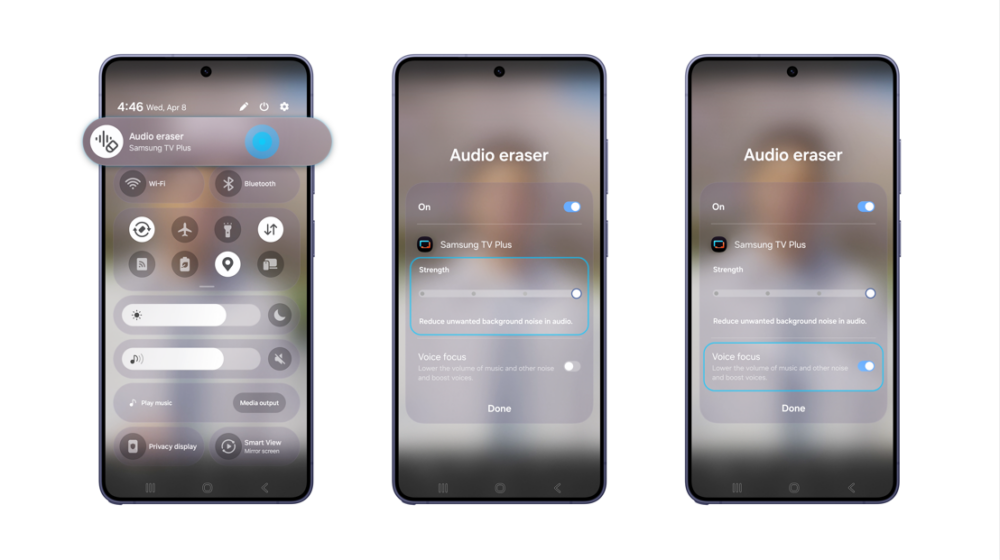
تمنحك سلسلة Galaxy S26 تجربة استخدام سلسة، حيث أصبح بإمكانك تعديل الضوضاء وتقليل التشويش مباشرة من لوحة الإعدادات السريعة (Quick Panel)، دون الحاجة إلى إعادة تشغيل المحتوى أو الرجوع خطوة للخلف. وأثناء تشغيل الفيديو، ما عليك سوى السحب من أعلى يمين الشاشة إلى الأسفل، ثم النقر على أيقونة Audio Eraser لبدء تنقية الصوت على الفور.
بمجرد تفعيل الميزة، تظهر أدوات تحكم متقدمة تمنح المحتوى لمسة أكثر احترافية من خلال خيارات الضبط، من أبرزها شريط ضبط مستوى تقليل الضوضاء بدقة، ووضع Voice Focus للاستماع للحوارات في الفيديوهات بوضوح عالٍ. فمع سلسلة Galaxy S26 series، أصبح بمقدورك الاستمتاع بجودة صوت مصممة خصيصاً لك في الوقت الحقيقي، بغض النظر عن نوع المحتوى.
▲ الوصول إلى ميزة Audio Eraser عبر لوحة الإعدادات السريعة في سلسلة Galaxy S26، مع عناصر تحكم لضبط مستوى تقليل الضوضاء وتفعيل Voice Focus
لم تعد ميزة Audio Eraser تقتصر على تقليل الضوضاء فحسب، بل باتت تتيح لك تشكيل الصوت بما يناسب تفضيلاتك، وفي الوقت الحقيقي، مما يمنحك تجربة استماع أكثر تخصيصاً وراحة مع سلسلة Galaxy S26.
Faster, In Real-Time, Enhanced ‘Audio Eraser’ With the Galaxy S26 Series
Audio Eraser on Galaxy devices reduces unnecessary noise in videos and amplifies desired sounds, enabling a more immersive viewing experience. First introduced for editing saved content on the Galaxy S25 series, the feature has evolved significantly over the generations. Audio Eraser expanded to support playback adjustments within native apps — such as Gallery and Voice Recorder — on Galaxy Z Fold7 and Z Flip7.
Now, with the Galaxy S26 series, it has reached new heights by supporting real-time audio control on content streamed across various platforms. In this article, we’ll dive deeper into these advancements.
From Fix it Later to Filter it Now
Starting with the Galaxy S26 series, Audio Eraser has evolved into a live audio experience. It enables real-time sound separation and optimization across voices, music and background noise, not only for recorded content but also for over-the-top (OTT) or social media content you are watching. This advancement shifts the focus from post-recording edits to real-time audio management.
By integrating an AI sound engine with advanced sound separation technology, the Galaxy S26 series allows you to instantly adjust and control sound as it occurs. This ensures a clear, immersive listening experience across various streaming platforms by effectively neutralizing distracting background noise.
The video below shows how the Galaxy S26 series keeps the sounds you want to hear clear, even in noisy environments.
Seamless Access, Total Control
You can easily adjust noise and reduce distractions directly from the Quick panel without needing to rewind or replay content. While the video is playing, simply swipe down from the top right of the screen and tap the Audio Eraser icon to start filtering the sound right away.
Once activated, the feature offers advanced controls for a more professional touch. You can adjust the “Strength” slider to fine-tune noise reduction and enable “Voice Focus” to hear crystal-clear dialogue in the video.
With the Galaxy S26 series, you can enjoy tailored sound quality in real-time, regardless of the content you’re watching.
▲Access Audio Eraser via the Quick panel on the Galaxy S26 series, with controls to adjust “Strength” and enable “Voice focus.”
Audio Eraser is no longer limited to reducing noise. It now allows you to easily design your sound in real time. Enjoy the more personalized and comfortable listening experience with the Galaxy S26 series.